Categories

Blog posts about QNAP's products and technologies.
An In-Depth Look at the All-New Qsirch 7.0 Workspace
When Data Is More Than Files—It Becomes Knowledge to Be Understood
In the era of digital transformation, both organizations and individuals generate and accumulate massive amounts of data every day—market reports, research papers, project documents, meeting notes, and countless email exchanges. These are all valuable assets. Yet even when securely stored on a QNAP NAS, turning them into usable insights at the moment they are needed can be challenging.
Traditional search helps you find files, but it cannot answer deeper questions:
These are exactly the challenges Qsirch 7.0 is designed to solve.
With the introduction of Workspace and RAG Search (Beta), Qsirch evolves from a NAS search tool into an AI-powered knowledge assistant—one that understands content, analyzes data, and supports informed decision-making. Your NAS becomes a truly intelligent data hub.
Turning Your NAS into a Personal AI Knowledge Base
From “Searching” to “Understanding”
The core concept behind Workspace is RAG (Retrieval-Augmented Generation).
This means Qsirch no longer simply retrieves files from your NAS. Instead, it first identifies the most relevant content from a defined data scope, then combines it with large language models (LLMs) to generate insights that are readable, contextual, and usable.
In Qsirch 7.0, Workspace functions as a dedicated knowledge domain.
Using embedding models, document content is converted into semantic vectors, allowing the system to understand context, key points, and relationships between files. Based on the instructions you define within a Workspace, AI can then generate summaries, comparisons, structured insights, and key takeaways—transforming scattered files into organized knowledge.
You can create different Workspaces based on projects, research topics, or departmental needs. Only the vectorized content within that Workspace is sent to your selected LLM for response generation, ensuring focused, controlled, and relevant results.
Qsirch 7.0 offers flexibility to match your deployment and security requirements:
Cloud-based LLMs
Supports OpenAI ChatGPT, Google Gemini, Microsoft Azure OpenAI, and other OpenAI API–compatible models such as DeepSeek and xAI Grok, enabling rapid access to cloud AI capabilities.
Private (On-Premises) LLMs
Ideal for organizations with strict privacy, compliance, or offline requirements. Supports popular open-source models including DeepSeek, Phi, Mistral, and Gemma.
No matter which architecture you choose, your data always remains under your control on the NAS.
AI does not replace your expertise—it accelerates understanding, clarifies insights, and supports faster, better decision-making.
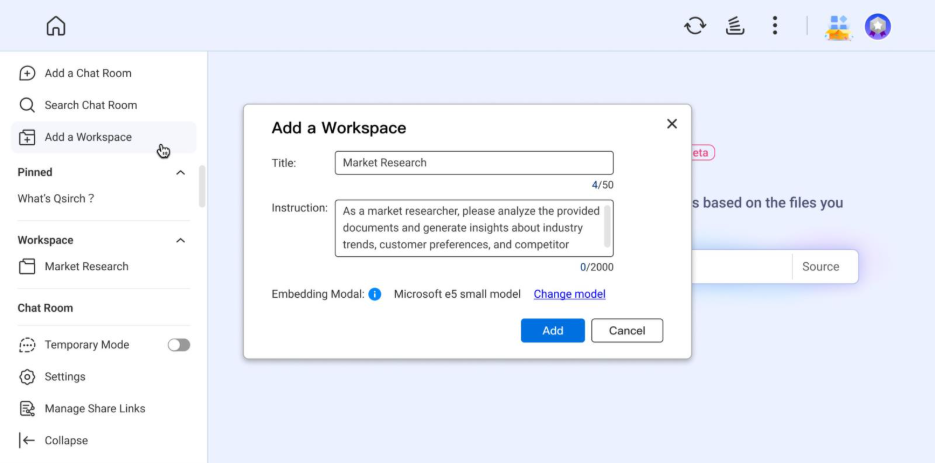
1. Create a Workspace and Define the Goal
Create a dedicated Workspace for each task. Set a title and instructions to clearly define the AI’s role and analytical direction.
2. Import Data and Build the Knowledge Base
Add relevant documents to the Workspace. Supported formats include Word, Excel, PowerPoint, PDF, Email (.eml), TXT, and Markdown, allowing AI to analyze information in full context.
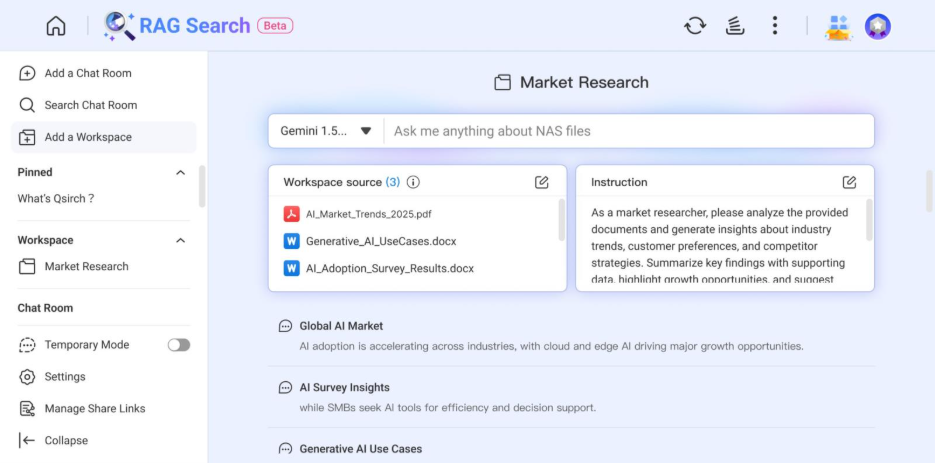
3. Generate Insights Instantly
Using embedding models, AI understands semantics and context, then generates summaries, comparative analyses, or key insights based on your instructions.
Customized AI Analysis for Real-World Use Cases
Workspace is not a one-time Q&A tool—it is a persistent analytical environment that continuously builds knowledge around a specific topic.
Create tailored AI instructions for scenarios such as market research, regulatory compliance, or product comparison to get focused, high-value results.
Deep Semantic Understanding
By combining embedding models with LLMs, Qsirch understands relationships, context, and nuances across documents—delivering true comprehension, not just surface-level summaries.
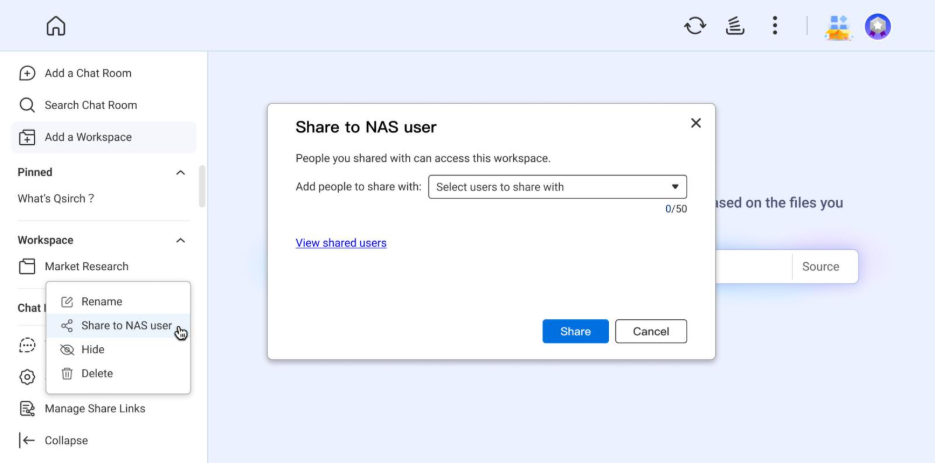
One-Click Sharing for Better Team Collaboration
Workspaces can be shared with other NAS users. Teams collaborate using the same datasets and AI-generated insights, eliminating information gaps and improving efficiency.
Market Researchers & Business Analysts
Import industry reports, survey results, and competitor data. Ask AI to summarize trends, identify opportunities, and generate strategic insights for faster decision-making.
Academic Research & Learning
Upload multiple academic papers and ask questions about research methodologies or core arguments. AI helps structure literature reviews and accelerates research and writing.
Project Managers & Development Teams
Centralize meeting notes, technical specifications, and customer requirements in one Workspace. Instantly query project details or generate progress summaries without manual document review.
System Requirements
Setup Steps
With the launch of Qsirch 7.0 Workspace, your NAS is no longer just a place to store files—it becomes an AI-powered knowledge brain capable of understanding, analyzing, and responding to your data.
Update Qsirch today and experience how AI transforms your data into real value.
