Categories
Blog posts about QNAP's products and technologies.
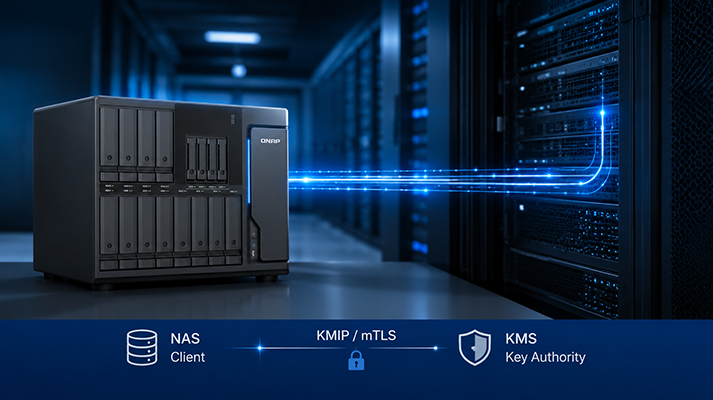
When enterprises begin adopting the Key Management Interoperability Protocol (KMIP), the KMS should remain separate from the device that stores production data, rather than having a general-purpose storage device assume both roles. This is a fundamental principle of Separation of Duties (SoD): The KMS and the administrator of production data should be two distinct roles.
Key Management System (KMS) serves as the root of trust for the entire environment, requiring an environment with a minimal footprint and maximum hardening. By contrast, a NAS is designed as a high-capacity, multi-service storage system that functions as a KMIP client, making the two fundamentally opposite in nature.
QNAP’s Design Philosophy: QNAP’s decision not to support QNAP NAS as a KMS is an intentional architectural design intended to uphold the principle of separation of duties, placing key management authority in a dedicated, auditable KMS, while the NAS is responsible only for requesting cryptographic keys when needed, ensuring that the organization’s encryption architecture remains compliant and effective.
In practice, it is common to see teams needing a KMS to centrally manage the encryption keys for shared folders and volumes in order to meet security audit requirements. However, as commercial KMS solutions can be costly, they use storage devices to reduce costs.
However, this is a dangerous false economy: organizations may think they have saved the cost of a KMS, but they are relying on the wrong architecture to take on the most critical role. The money saved does not necessarily translate into real security, and it also departs from the core design philosophy of a KMS.
Some storage solutions on the market provide a built-in KMS role, but from an audit perspective, a design in which data and keys reside on the same system lacks a clear separation of responsibilities. A single management interface with control over both data and keys is itself a single point of failure that auditors are unlikely to accept, regardless of the strength of the encryption technology.
The key to understanding this is the concept of the Single Root of Trust.
When an organization reaches the point where KMIP is required, it means that encryption keys must be centrally governed across the entire environment, rather than being used solely by NAS systems. Typical on-premises enterprise scenarios include:
Once KMS becomes the Single Root of Trust for all of the above devices, its security requirements are far higher than those of any device it manages. Specifically, enterprise-grade KMS solutions are typically required to provide: a Hardware Security Module (HSM)-supported keystore, strict separation of duties, a complete and auditable key lifecycle, and independent cryptographic module validation.
Therefore, KMS plays a role at a higher security level than the systems it manages.
The key material itself is extremely small—the keys, metadata, and policies combined typically amount to only a few megabytes for most enterprises. An ideal KMS follows the principle of minimization: it removes all functions unrelated to key management, retains only a single responsibility, keeps the trust boundary as small as possible, and makes independent auditing easier.
In contrast, the value of NAS is built on its multifunctional capabilities, including high capacity, file services, a rich application ecosystem, and support for diverse communication protocols. These are the strengths of NAS as a data platform, but they represent a different design goal from the “minimalist and single-purpose” approach required by KMS.
In QNAP’s architecture, the role of NAS is that of a capable KMIP client—leaving key custody to a dedicated KMS while focusing on its core storage functions. QuTS hero’s KMIP client provides the following design features:
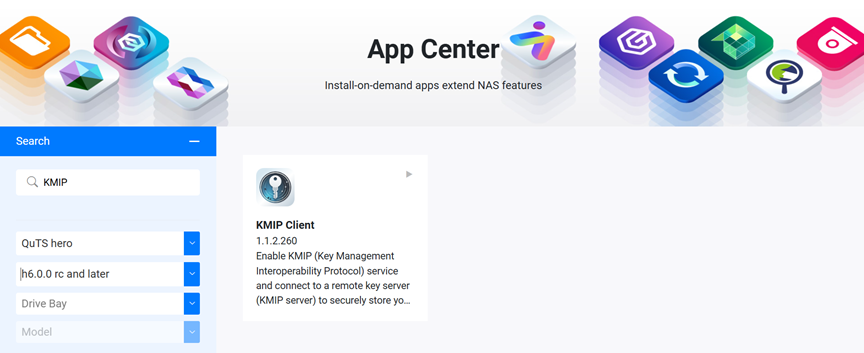
Regarding supported versions, the KMIP client has been available since QuTS hero h6.0. To install and configure it, install “KMIP Client” from App Center, then go to Control Panel > System > Security > KMIP Settings.
This is precisely the advantage of this division of responsibilities: the highest security responsibility for CMVP cryptographic module validation is handled by a professional KMS, rather than requiring every storage device to assume this responsibility itself. The NAS only needs to meet FIPS 140-3 design requirements for key exchange and delegate the root of trust to the appropriate authority.
Once the “NAS-as-a-client” model is established, the next step is to select an appropriate key management authority. The recommended approach is to choose between two paths based on audit requirements and budget:
| Scenario | Recommended Approach | Representative Solutions |
| Strict audit requirements | Use existing certified commercial KMS solutions | Thales CipherTrust Manager, Entrust KeyControl, IBM Guardium Key Lifecycle Manager, HashiCorp Vault Enterprise (KMIP secrets engine) |
| Budget is the primary consideration | Deploy a self-hosted KMIP server on a dedicated, controlled, and auditable host using containers | HashiCorp Vault / OpenBao (KMIP engine), Cosmian KMS; PyKMIP is for testing only |
The key is not which host runs the KMS, but whether the host is hardened, access control is enforced, and audit trails can be generated for review. As long as the key management authority remains independent from production storage and meets the governance requirements described above, both commercial and self-hosted solutions can provide a robust foundation for your encryption architecture.
During encryption audit validation, three terms are frequently confused with one another, but auditors examine them at completely different levels:
| Concept | What It Validates | Explanation |
| Interoperability | Whether a KMS can connect using KMIP and operate properly | “The protocol connection works successfully” |
| Algorithm validation (NIST CAVP) | Whether vendor implementations of algorithms such as AES/SHA/RSA are correct | “The mathematical operations are correct” |
| Cryptographic module validation (NIST CMVP, FIPS 140-2/140-3) | Whether the entire cryptographic module, including key management and the cryptographic module boundary, has passed validation and obtained a valid certificate | “The entire safe has been validated against security requirements” |
For auditors, the most important and typically most stringent requirement is cryptographic module validation. An algorithm implementation passing CAVP, or a module being in testing, does not mean it has a valid CMVP certificate that covers the key management components you rely on. Therefore, regardless of which KMS solution is selected, it is recommended to verify the validation status directly through the NIST CMVP validation list and confirm the certificate scope with your auditors.
KMIP itself is an open standard protocol that enables KMIP clients and servers from different vendors to communicate with each other. However, “being interoperable” is only the starting point; whether the solution can pass compliance validation is the real challenge enterprises must overcome.
The moment you implement KMIP, the goal is not to turn your NAS into a KMS, but to establish an independent, trusted, and auditable key management authority for the entire environment.
As a KMIP client, QNAP NAS entrusts key management to a professional KMS for centralized governance while focusing on storage and data services. This does not mean a feature is missing; rather, it is a deliberate decision to place the root of trust where it belongs. Keeping the lock and key separate is what makes security effective and enables successful audits.
To learn more about the QuTS hero KMIP Client configuration process, refer to the QNAP official tutorial:
https://www.qnap.com/go/how-to/tutorial/article/how-to-use-kmip-client-for-secure-key-management
Q: Can a NAS be used as a KMIP server?
A: QNAP NAS is intentionally designed to support only the KMIP client role, not the server role. A KMS serves as the root of trust and follows the principle of minimization (single responsibility and the smallest possible trust boundary), while a NAS is a high-capacity, multi-purpose data platform. The two have different design goals. Even purchasing another NAS dedicated to serving as a KMS would only mean using a multi-purpose platform for a task that requires a single-purpose system, while leaving most of its capacity unused. The correct approach is to use the NAS as a client and have keys managed and protected by a dedicated, auditable, independent KMS.
Q: Which QNAP software version first supports the KMIP client?
A: The KMIP client has been supported since QuTS hero h6.0. Install KMIP Client from App Center and enable it in the security settings in Control Panel.
Q: With a limited budget, is it necessary to purchase an expensive commercial KMS?
A: Not necessarily. Enterprises can deploy open-source/community-supported solutions with KMIP engines, such as HashiCorp Vault (Enterprise) or OpenBao, in an independent and hardened virtual machine or container environment. The key is to separate this environment from the NAS through physical isolation and access-control separation, while ensuring that it can generate complete access audit trails.
AI Disclosure: Some images and text in this article were created or refined with the assistance of Artificial Intelligence (AI) and reviewed by human editors.
