Categories
Blog posts about QNAP's products and technologies.
This is a story about how editors redefined their understanding of data security: protecting not just files, but also the team’s ability to keep working.
| Before Adoption | After Adoption | |
| Storage Architecture | Single Fibre Channel SAN | SAN + QNAP NAS TVS-h1688X |
| Time to Resume Work After a Failure | 2 to 3 days | 30 minutes (actual studio test results) |
| Options During a Failure | Suspend work and wait for the SAN to be rebuilt | Editors switch to the NAS directly and continue editing |
| External Media Ingestion Method | Manual transfer and physical delivery | Daily automatic downloads from the cloud, followed by verification before transfer |
| Remote and Cross-Company Collaboration | Not possible | Assistants working from home; shared folders for use across companies |
On the evening of March 3, 2022, a major power outage struck Taiwan. The studio’s UPS (uninterruptible power supply) actually held up. However, the studio’s owner, director Shieh, was away and could not return in time to shut down the system properly. An hour later, the UPS battery ran out, causing the SAN to lose power as well. When the system was powered back on the following morning, one hard drive had failed.
Not a single file was lost. RAID 6, a disk array that can withstand the simultaneous failure of two hard drives, preserved all the media files and project files. The problem was that the entire studio relied on this single storage system. While the SAN’s failed hard drive was being replaced and its array rebuilt, the three editors had nowhere else to work and had to stop working for two to three days. The team spent the following week catching up on the delayed work, working an extra four hours every day. Even so, they still missed the delivery deadline.
In the post-incident review, the studio reached one key conclusion: RAID and UPS provide fault tolerance, not redundancy. Fault tolerance keeps the system running; redundancy allows people to keep working. “A UPS doesn’t sell you security. It sells you time—and someone has to be there during that time,” Shieh Meng-ju later said.
Fault tolerance protects the underlying hardware and data: if one hard drive fails, no data is lost; if a power outage lasts a few minutes, the equipment can keep running. Redundancy & failover protect workflows and productivity: when the primary storage system is undergoing recovery and array rebuilding, the team has another working environment ready to take over immediately. That night, ZABA Studio had the former, but lacked the latter.
This realization became the starting point for the entire architecture that followed. What Director Shieh needed was not a more powerful SAN, but a second option: first, add an alternative alongside the SAN that would allow the team to resume work immediately, then use that same NAS to connect with external parties.
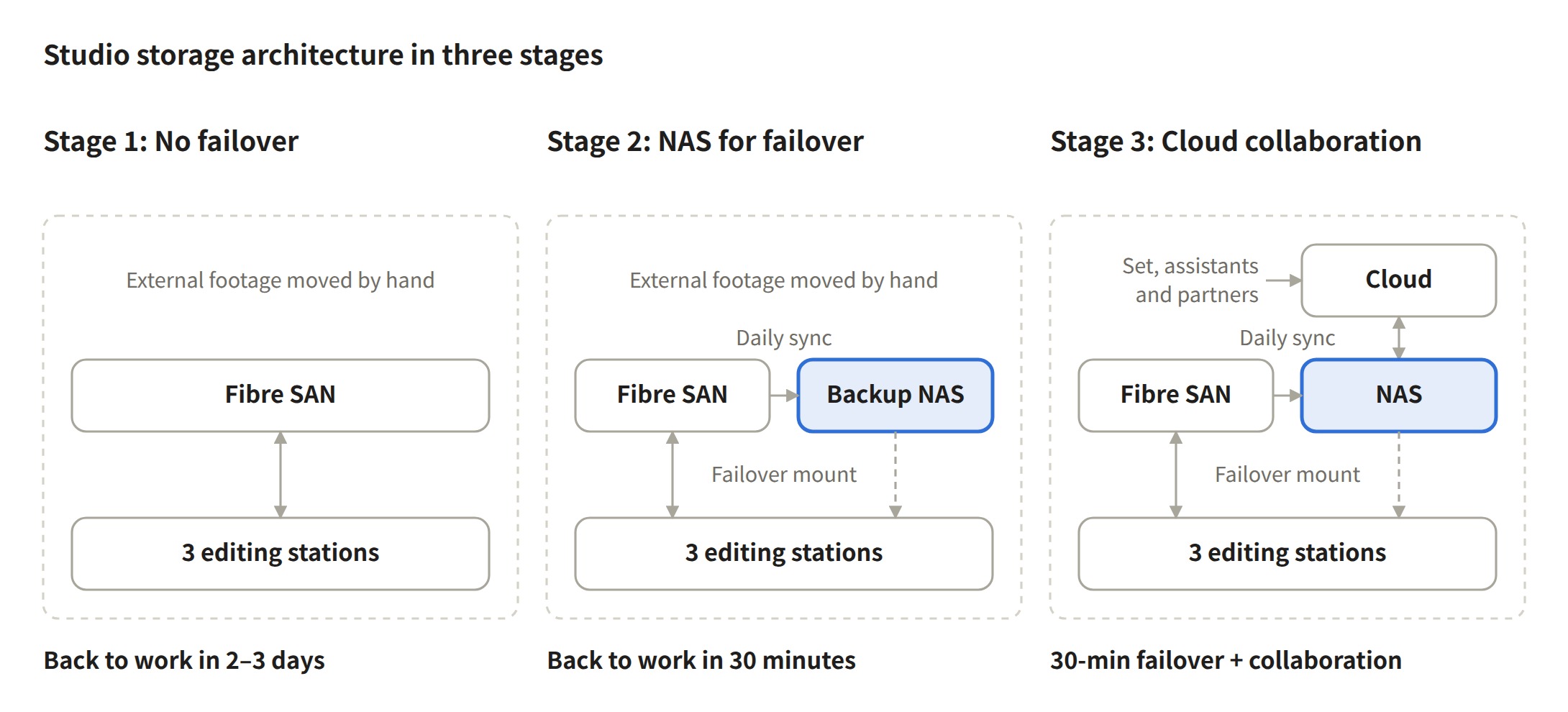
Figure: The Evolution of ZABA Studio’s Storage Architecture · Three Stages
The original goal behind adding the QNAP NAS TVS-h1688X was simple: to create a copy. The studio scheduled HBS 3 synchronization during off-peak hours each day to avoid competing for bandwidth with daytime editing work.
The next step was what truly changed the way the studio approached its storage architecture. As long as the folder structure on the NAS exactly matched that of the SAN, the backup copy could be used directly for work: editors could unmount the SAN, mount the NAS instead, and their Adobe® Premiere projects could relink all media files at once using the same relative paths.
To make this work, the studio established a standardized naming convention shared by everyone involved. The SAN and NAS, along with assistants working from home and partner companies, all use the same set of top-level folders: 01_Project / 02_Dailies / 04_Music / 05_SFX. It may seem like the least technical part of the setup, but the studio considers it the key to quick transitions: “Hardware can be replaced, but inconsistent folder structures cannot be fixed by swapping hardware.”
QNAP HBS 3 supports one-way, two-way, and active synchronization, and integrates with a wide range of major public cloud services. Since the NAS was already being used for synchronization with the SAN, the studio took the opportunity to connect it to public cloud storage as well.
The NAS was therefore divided into two volumes: Volume A (50 TB) serves as the external synchronization volume, handling cloud-to-local transfers, cross-company file sharing, and media file verification. Volume B serves as the internal redundancy volume, with a folder structure that exactly matches that of the SAN, allowing editors to resume work immediately. With dual 10GbE, internal editing and external synchronization each use a separate network path.
The daily workflow for dailies has now changed to: Upload from the filming location to the cloud → Sync to the NAS with HBS 3 → Verify with local scripts and transfer to the SAN → Ready for editing. Remote assistants can work from home, exchanging project files, sound effects, and music through shared cloud folders.
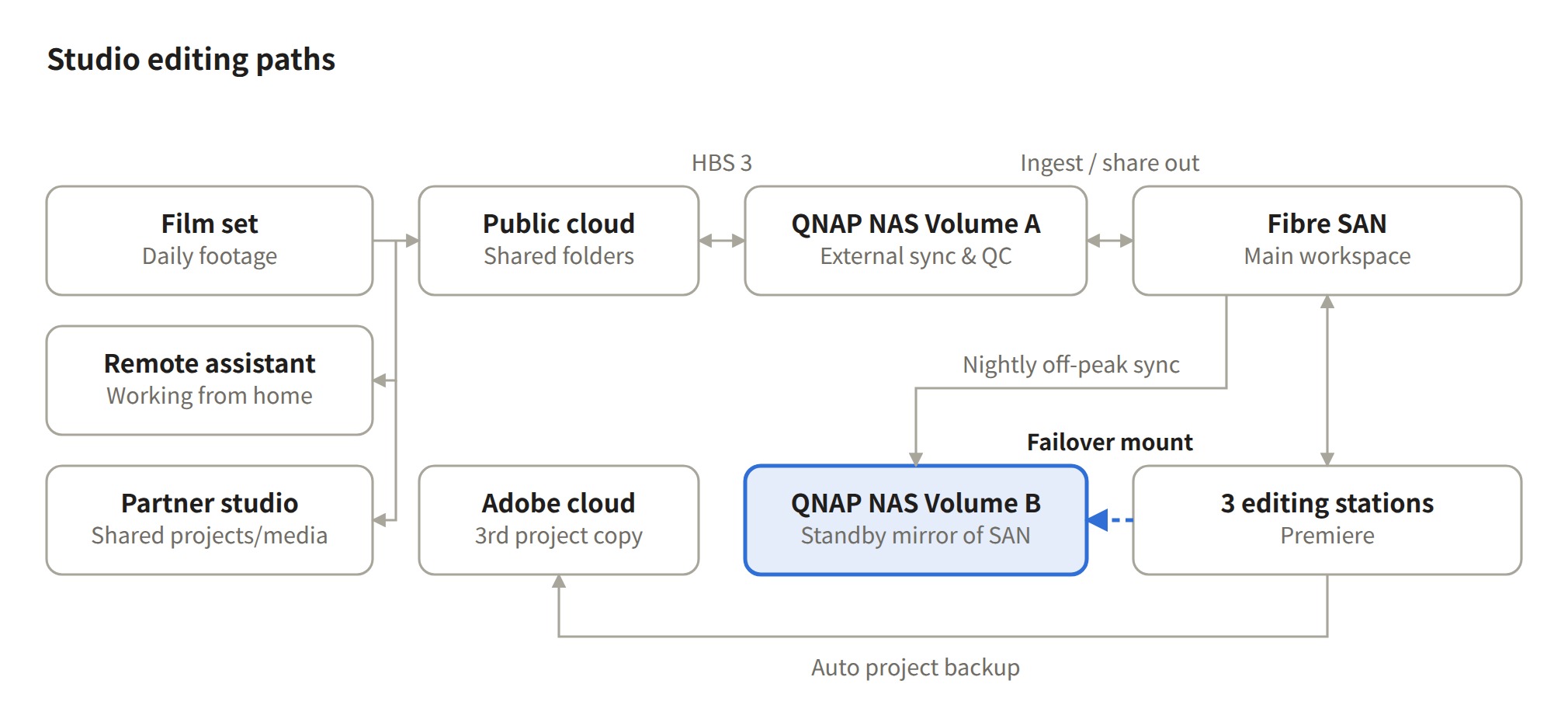
Figure: ZABA Studio Storage Architecture · Data Flow and Mounting Redundant Storage
The most representative case study is Pigsy, winner of Best Animated Feature at the 60th Golden Horse Awards. The animation studio handling production and the editing team at ZABA Studio each have their own NAS synchronized with the same cloud folder. The editing team first determines the duration of each shot based on the animatic, guiding the production team’s animation and voiceover work. For minor revisions, such as replacing a shot or modifying a line of dialogue, the production team can open and modify the project directly, making updates visible to the editing team once synchronized.
Many studios instinctively assume that “the larger the files, the more frequently they need to be backed up.” ZABA Studio takes the opposite approach, choosing backup methods based on how frequently the data changes:
| Data Type | Size | Frequency of Change | Backup Method | Acceptable Lag |
| Daily Media (proxies, audio, and continuity sheets) |
2–10 TB | Rarely change after ingest | HBS 3 off-peak schedule | One day |
| Working Projects (Premiere Productions) |
10s of MB | Every minute | Local + SAN + Adobe® Cloud (3 Locations) | Near real-time |
The trade-off behind this approach is clear: the studio deliberately gives up real-time media sync so team can resume work immediately. If a day’s worth of media files is lost, the production crew can provide another copy. But if the studio is unable to work for two to three days, the creative time lost can never be recovered.
The two to three days of downtime caused by that night’s power outage were reduced to just 30 minutes under the new architecture.
The studio deliberately measured the 30-minute recovery time based on when editors could actually resume work. After confirming that the SAN could no longer be mounted, all three editing workstations switched to NAS Volume B at the two-minute mark. By minute five, Premiere Productions reassigned the source folders, reconnecting all media files at once through their relative paths. By minute 10, the timeline was ready for playback. The remaining 20 minutes were spent on Premiere recalculating its cache. The studio’s guiding principle is: “Recovery time should be measured not just by when the system is restored, but by when people can get back to work.”
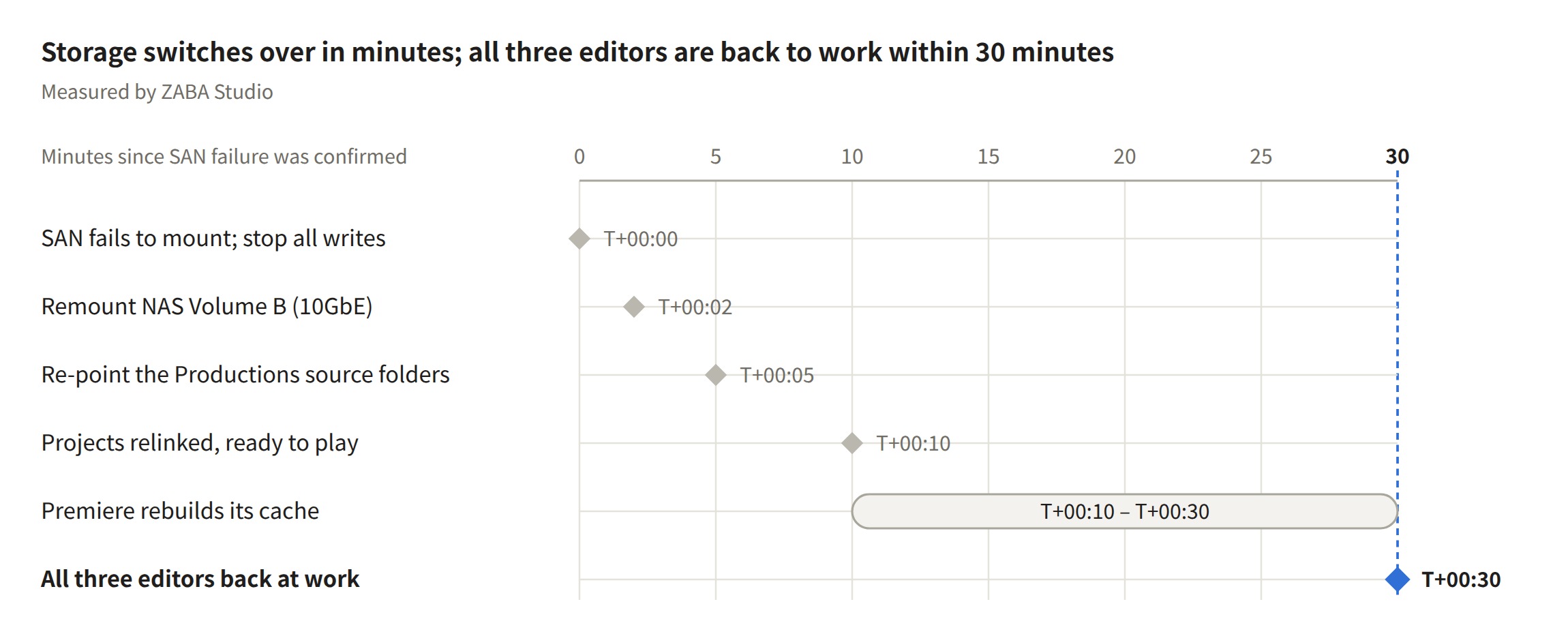
Figure: Post-SAN Failure Recovery Timeline · 30-Minute Recovery in Actual Testing
The NAS also adds several layers of protection that RAID alone cannot provide. Snapshots allow accidentally deleted or overwritten files to be restored to a previous state. UPS integration enables the NAS to shut down safely upon detecting a power outage, preventing the same scenario that occurred during the previous outage from happening again on the NAS side. With the SAN and NAS each holding a copy of the data, an additional independent copy of the data is maintained beyond RAID. Because snapshots and the original data reside on the same device, a two-copy storage architecture is still required to provide comprehensive data protection.
ZABA Studio also candidly lists what is still missing. Currently, the cloud stores copies of media files only, not project files. An off-site NAS is planned to provide protection against site-specific disasters such as natural disasters. On the SAN side, the setup involves two Mac mini MDCs and a storage array rack, and UPS-linked shutdown is still under investigation. Looking further ahead, the studio hopes to enable semantic search for media files, automate the transcription of continuity sheets and dialogue, and automate archiving to clear Volume A one month after filming wraps.
The studio sums up this evolution in one sentence: the design goal shifted from “Keeping Data Safe” to “Minimizing Downtime,” and the next step is to “Letting It Run Itself.” What began as a simple effort to add another layer of insurance ultimately resulted in a studio that can keep running without the person in charge being physically present.
If your team also relies on a single primary storage system, start by asking one question: If the primary workspace goes down, do your editors have a second place where they can continue editing?
Feel free to contact the QNAP team to discuss practical use cases and arrange a trial based on your workflow.
Each addresses a different aspect of data protection:
| Mechanism | Question It Answers | What It Can Handle | What It Cannot Handle |
| RAID | If a hard drive fails, is the data still intact? | Failure of one or two drives | Accidental deletion, ransomware, or failure of the entire device |
| Backup | Can lost or encrypted data be recovered? | Accidental deletion, device damage, and ransomware | Downtime during recovery |
| Redundancy & failover | If the primary system fails, can people keep working? | Downtime caused by primary storage failure | When used alone, it cannot replace versioning or off-site protection |
ZABA Studio’s NAS serves as both a backup and a redundancy solution: it maintains a copy of the SAN and has an identical structure, allowing editors to resume work directly from the NAS. Switching is handled manually at the editing workstations.
Yes. ZABA Studio’s RAID 6 prevented any data loss, but the editors still had to stop working for two to three days because there was no alternative working environment while the SAN was being rebuilt. A second NAS provides both data backup and work continuity. If the primary storage system is being rebuilt or data is accidentally lost, editors can switch to the NAS and continue working.
Project files are small and change every minute. ZABA Studio keeps them simultaneously across three locations—local storage, the SAN, and Adobe® Cloud—to provide near-real-time protection. Premiere Productions’ project locking mechanism ensures that only one person can write to a given project at a time.
The key is to make the folder structure on the NAS redundancy volume exactly match that of the primary workspace. ZABA Studio uses QNAP HBS 3 to synchronize the SAN to NAS Volume B daily during off-peak hours. If the primary storage fails, editors can mount Volume B, and Premiere can relink the files in bulk using matching folder names and relative paths.
Take the animated feature Pigsy as an example, the animation studio and ZABA Studio each use their own NAS synced to the same cloud folder with an identical directory structure. Once the production team updates a project file, the editing team sees the changes as soon as it syncs.
The QNAP TVS-h1688X serves as both a second working path in the event of a primary storage system (SAN) failure and a hub for external collaboration. It handles the daily cloud-to-local transfer of dailies from the filming location, supports assistants working from home, and syncs with the animation studio’s NAS to complete the editing of Pigsy, winner of Best Animated Feature Film at the Golden Horse Awards.
Some of the text and visual materials in this article were generated with the assistance of AI technology and reviewed and verified by the author to ensure content quality.
